The Color Class#
The Color class is used to represent Excel color in the XlsxWriter
interface. It can be used to define RGB colors, Named colors and Theme colors:
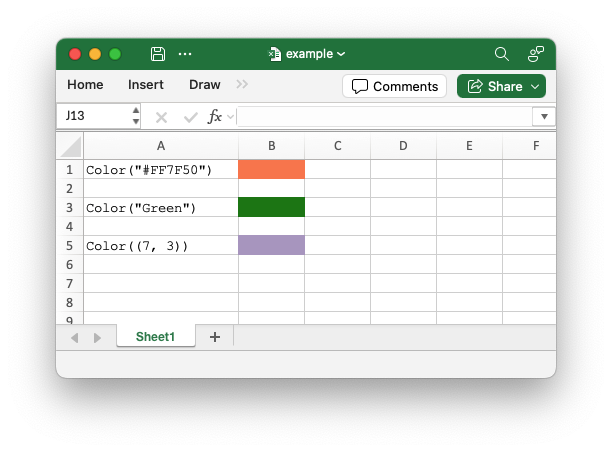
from xlsxwriter.color import Color

# A Color instance using the HTML string constructor.
color_format = workbook.add_format({"bg_color": Color("#FF7F50")})
worksheet.write_string(0, 0, 'Color("#FF7F50")')
worksheet.write_blank(0, 1, None, color_format)

# A Color instance using a named color string constructor.
color_format = workbook.add_format({"bg_color": Color("Green")})
worksheet.write_string(2, 0, 'Color("Green")')
worksheet.write_blank(2, 1, None, color_format)

# A Color instance using the Theme tuple constructor.
color_format = workbook.add_format({"bg_color": Color((7, 3))})
worksheet.write_string(4, 0, "Color((7, 3))")
worksheet.write_blank(4, 1, None, color_format)
See also Working with Colors.
Constructor#
- Color(color)#
Create a new XlsxWriter Color object.
The Color constructor can be used to create colors in three ways:
String argument
A string to represent an RGB color in HTML format
#RRGGBB. The range is from#000000(black) to#FFFFFF(white). A limited number of named colors likeGreen,Red, andBlueare also supported. These are shortcuts for RGB colors. Seergb()below for more details.Integer argument
An integer to represent an RGB color in the format
0xRRGGBB. As with the HTML variant, the range is from0x000000(black) to0xFFFFFF(white). See thergb_integer()below for more details.Tuple
Theme colors are defined by a tuple of two integers: the first is the theme color index (0-9) and the second is the theme shade index (0-5). See the
theme()below for more details.
color.rgb()#
- rgb(color)#
Create a user-defined RGB color from a HTML color string.
- Parameters:
color (str) – An RGB value in the range
#000000(black) to#FFFFFF(white).- Returns:
A Color object representing the RGB color.
- Return type:
Color
Create a user-defined RGB color from a HTML color string:
from xlsxwriter.color import Color

# Create a red color.
red_color = Color.rgb("#FF0000")
This is an explicit method that is equivalent to the Constructor with a string value.
XlsxWriter also supports a limited number of named colors. The named colors are shortcuts for RGB colors:
from xlsxwriter.color import Color

# Create a green color.
green_color = Color.rgb("Green")
The named colors are:
Color name |
RGB color code |
|---|---|
Black |
|
Blue |
|
Brown |
|
Cyan |
|
Gray |
|
Green |
|
Lime |
|
Magenta |
|
Navy |
|
Orange |
|
Pink |
|
Purple |
|
Red |
|
Silver |
|
White |
|
Yellow |
|
color.rgb_integer()#
- rgb_integer(color)#
Create a user-defined RGB color from an integer.
- Parameters:
color (int) – An RGB value in the range 0x000000 (black) to 0xFFFFFF (white).
- Returns:
A Color object representing the RGB color.
- Return type:
Color
Create a user-defined RGB color from an integer value:
from xlsxwriter.color import Color

# Create a blue color.
blue_color = Color.rgb(0x00FF00)
This is an explicit method that is equivalent to the Constructor with an integer value.
color.theme()#
- theme(color, shade)#
Create a theme color.
This is an explicit method that is equivalent to the Constructor with a tuple value. Theme colors represent the default Excel theme color palette:
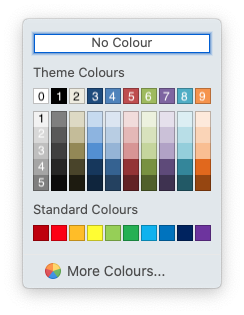
The syntax for theme colors is (color, shade) where color is one of the
0-9 values on the top row and shade is the variant in the associated column
from 0-5. For example “White, background 1” in the top left is color.theme(0, 0)
and “Orange, Accent 6, Darker 50%” in the bottom right is color.theme(9, 5).