Working with Colors#
Colors are represented in XlsxWriter using the The Color Class. There are 3 types of colors that can be used in XlsxWriter:
User-defined RGB colors using HTML syntax like
#RRGGBB.Predefined named colors like
Green,Yellow, andBlue. These are shortcuts for RGB colors.Theme colors from the standard palette of 60 colors, such as
Color(9, 4). The theme colors are also shown below.
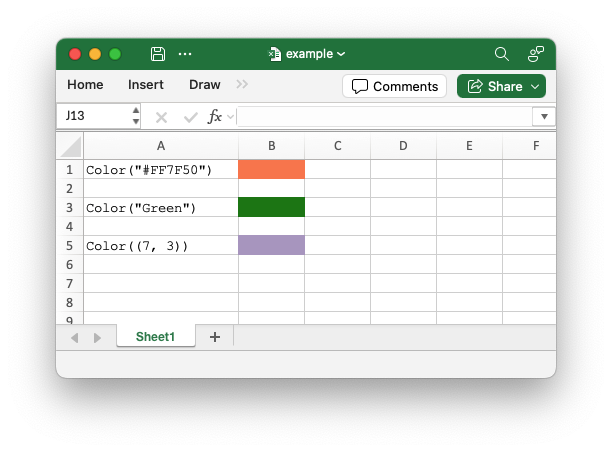
These color variants are explained in more detail in the sections below.
Color objects can be used throughout the XlsxWriter APIs, including the following:
In the The Format Class to set the font color, background color, border color and other colors.
In the
add_chart()method and sub-properties to set the color of chart elements.In Conditional Formatting to set the color of cells. See the
conditional_format()method.
RGB Colors#
XlsxWriter supports the use of RGB colors in the HTML format #RRGGBB. The
range is from #000000 to #FFFFFF:
from xlsxwriter.color import Color

color_format = workbook.add_format({"bg_color": Color("#FF7F50")})
Named Colors#
XlsxWriter supports a limited number of named colors. The named colors are shortcuts for RGB colors:
from xlsxwriter.color import Color

color_format = workbook.add_format({"bg_color": Color("Green")})
The named colors are:
Color name |
RGB color code |
|---|---|
Black |
|
Blue |
|
Brown |
|
Cyan |
|
Gray |
|
Green |
|
Lime |
|
Magenta |
|
Navy |
|
Orange |
|
Pink |
|
Purple |
|
Red |
|
Silver |
|
White |
|
Yellow |
|
Theme Colors#
Theme colors represent the default Excel theme color palette:
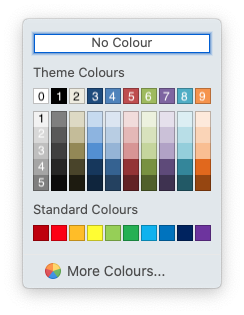
The syntax for theme colors in Color is Color(color, shade),
where color is one of the 0-9 values on the top row and shade is the
variant in the associated column from 0-5. For example, “White, background 1” in
the top left is Color(0, 0), and “Orange, Accent 6, Darker 50%” in the bottom
right is Color(9, 5).
Color Strings#
For simplicity and backward compatibility, colors can also be represented as an HTML color string:
from xlsxwriter.color import Color

# Explicit RGB color object.
color_format = workbook.add_format({"bg_color": Color("#FF7F50")})

# Implicit RGB color string.
color_format = workbook.add_format({"bg_color": "#FF7F50"})
The bare strings are parsed and converted to a Color object internally.